Task Manager, for your AI.
Remember opening Task Manager to see what was really running? This sits in your menu bar and does that for your AI: limits, spend, subscriptions, every MCP server running right now, and the agents, skills and guardrails your tools have installed.
Free and MIT licensed, for macOS (Intel and Apple Silicon) and Windows 10 and 11. Use it as it is, or clone it and make it yours. The installers are not code-signed yet, so macOS blocks the first launch until you allow it under Privacy & Security, and Windows shows a SmartScreen warning. The demo below is the real interface running on made-up data.
- Price
- Free
- Runs on
- Mac + Winmenu bar · system tray
- License
- MITread the source
- Data collected
- Noneno telemetry, no account
- Size
- 26 MBinstalled, macOS
- Languages
- 9English · 中文 · Русский · Español · Français · Deutsch · 日本語 · Português (Brasil) · 한국어
What’s new in 0.1.2 - 2026-09-26
- Agent folders resolve on Windows too
- Agent spend names the client it mostly went to
- An opt-in
/v1/agentsfeed
One small window. A lot behind it.
It opens at 380 pixels wide and stays out of the way. Click anything and it goes a level deeper, in the same window.
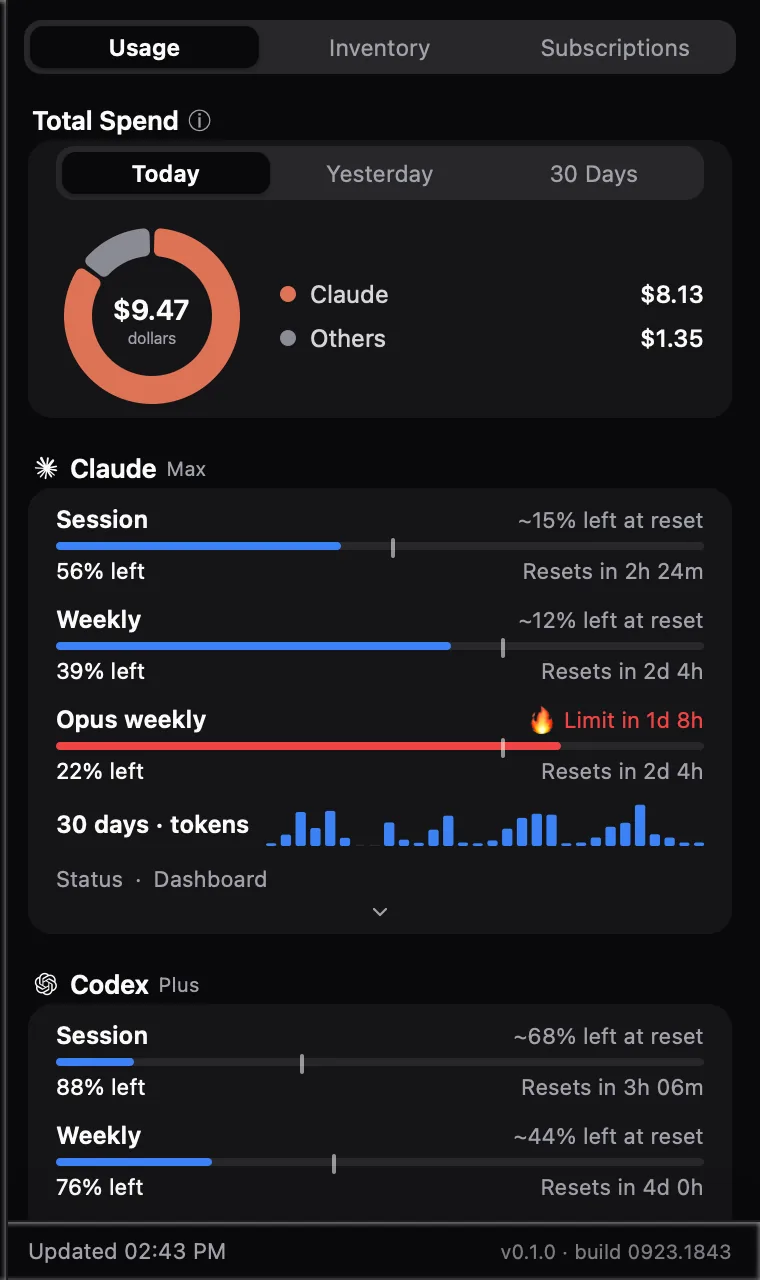
Every limit, one glanceSession, weekly and model limits across your tools, with a warning on the one that runs out before it resets. 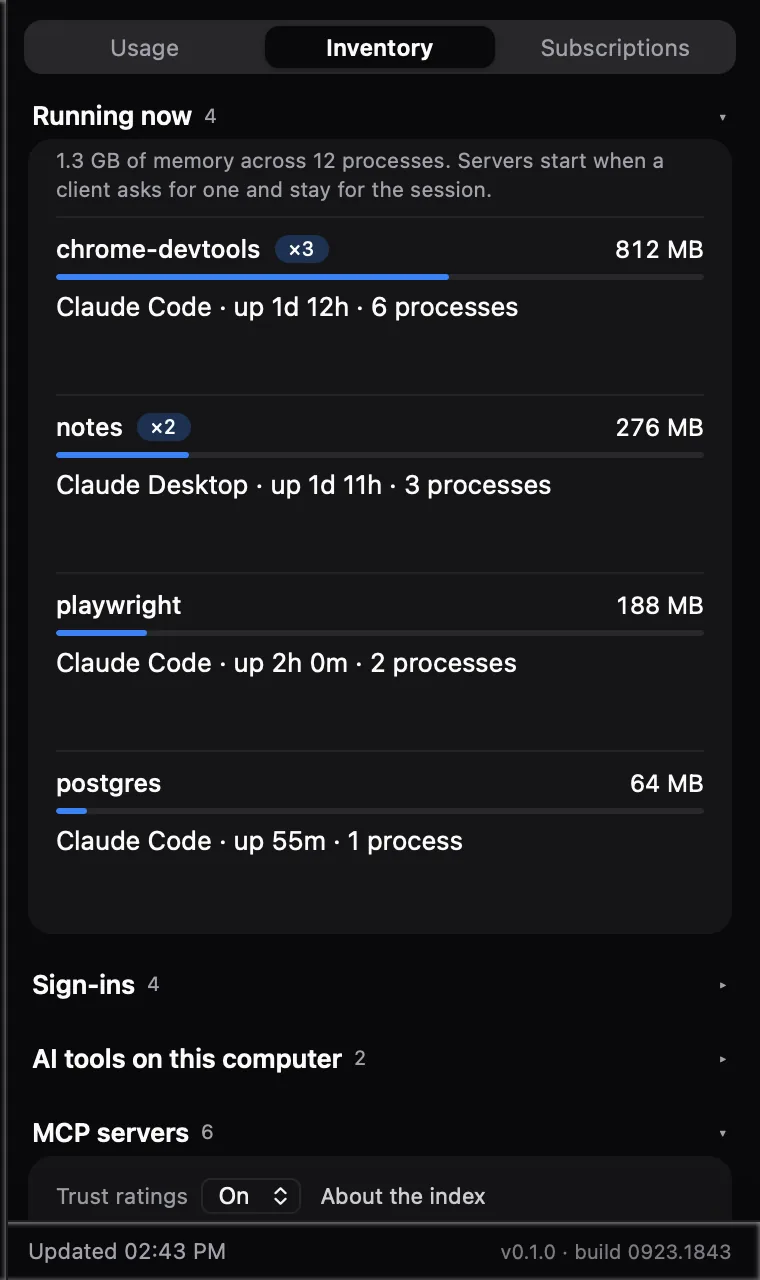
What is actually runningThe throwback, done properly. Every MCP server live right now, heaviest first, with a copy count when an app has started its own. 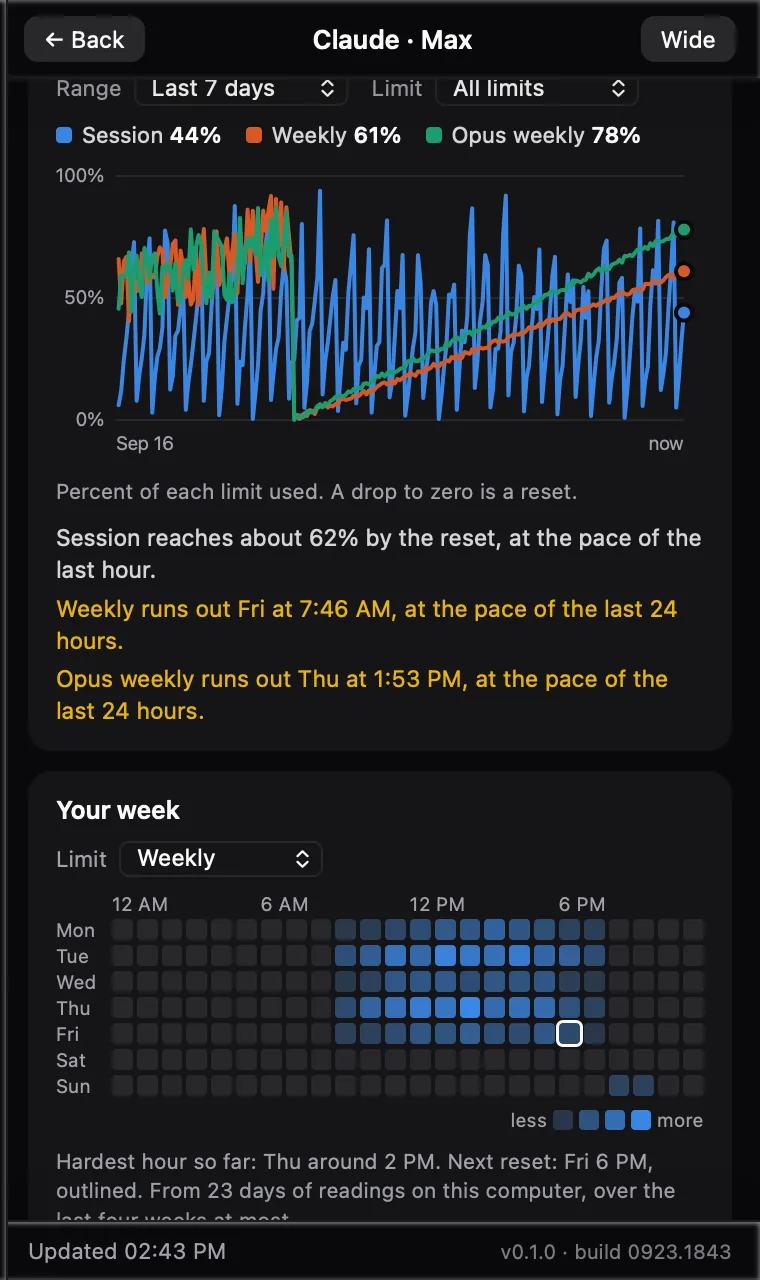
When does it run out?A forecast from your recent pace, in a sentence. It says which pace it used, and goes flat when you have been idle. 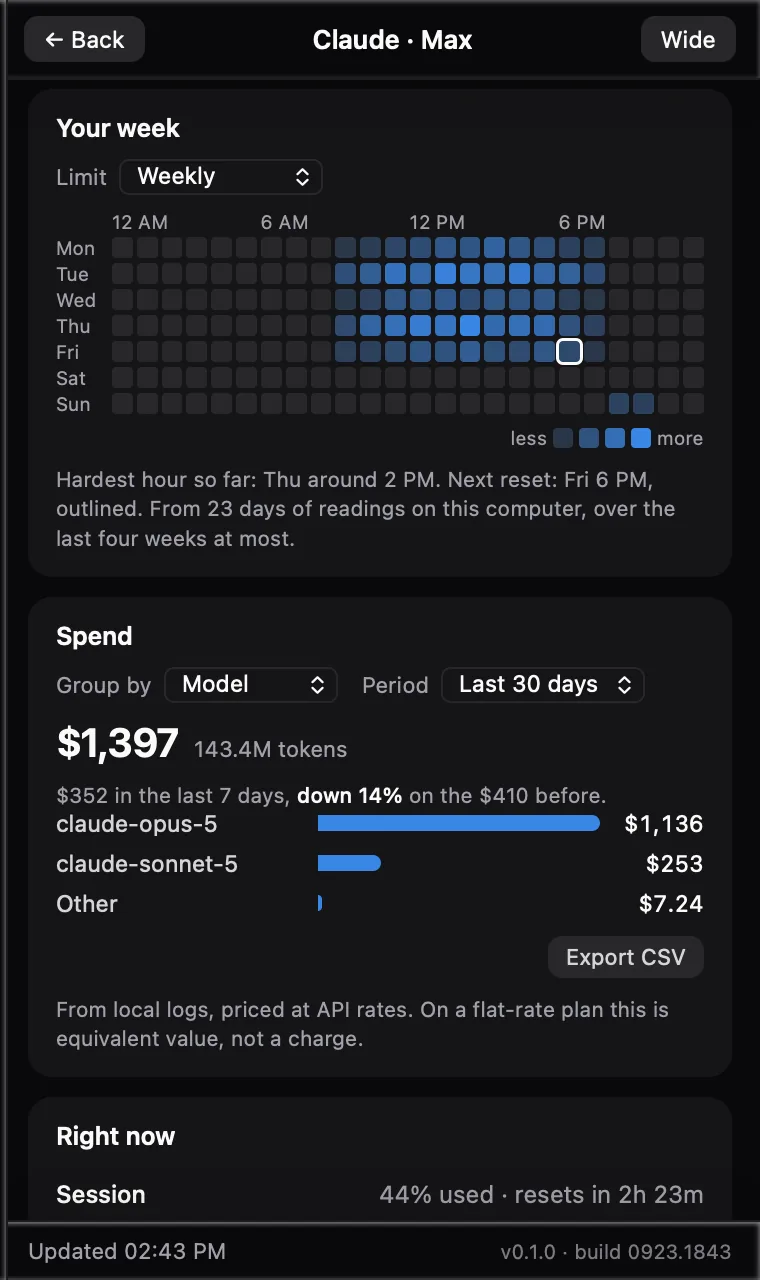
Your week, by the hourWhich hours actually eat the limit, with the next reset outlined. Hours nobody measured are left blank, not guessed. 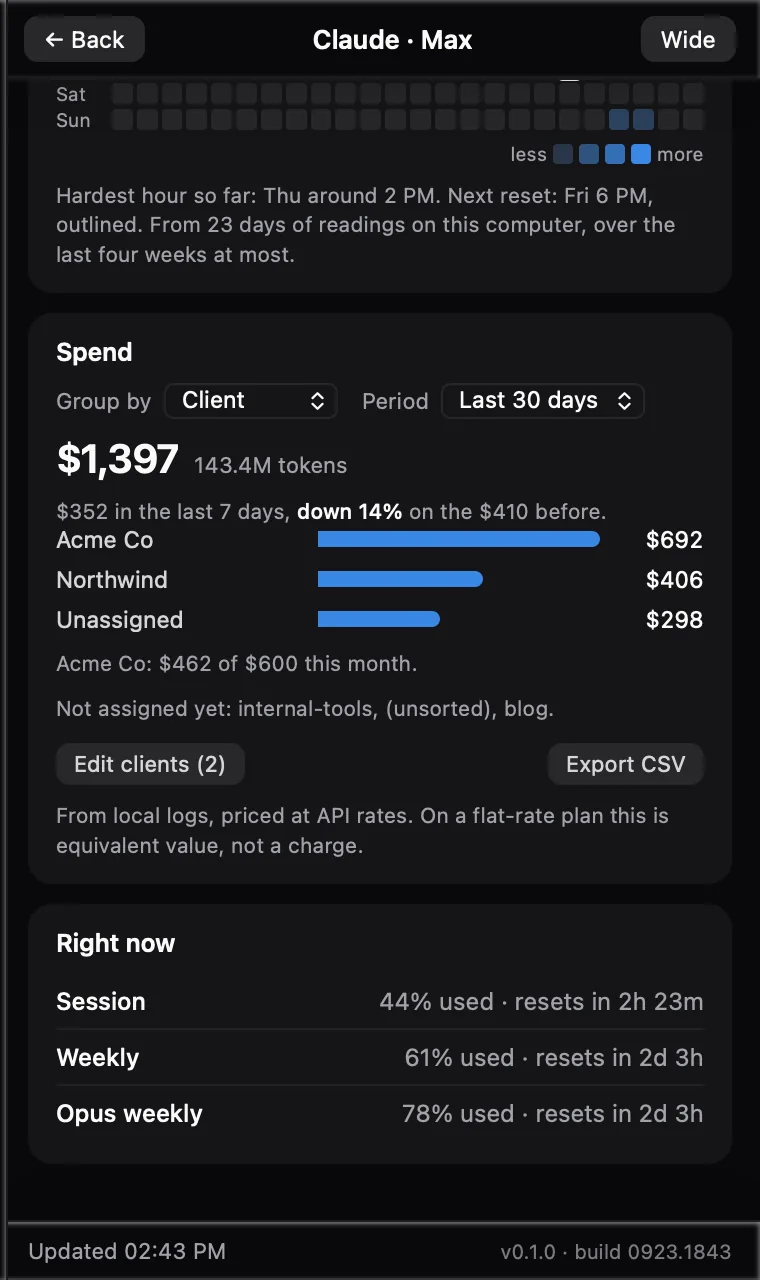
Spend by clientMap folders to clients once. Every dollar lands in exactly one row, with a budget per client and a CSV for the invoice. 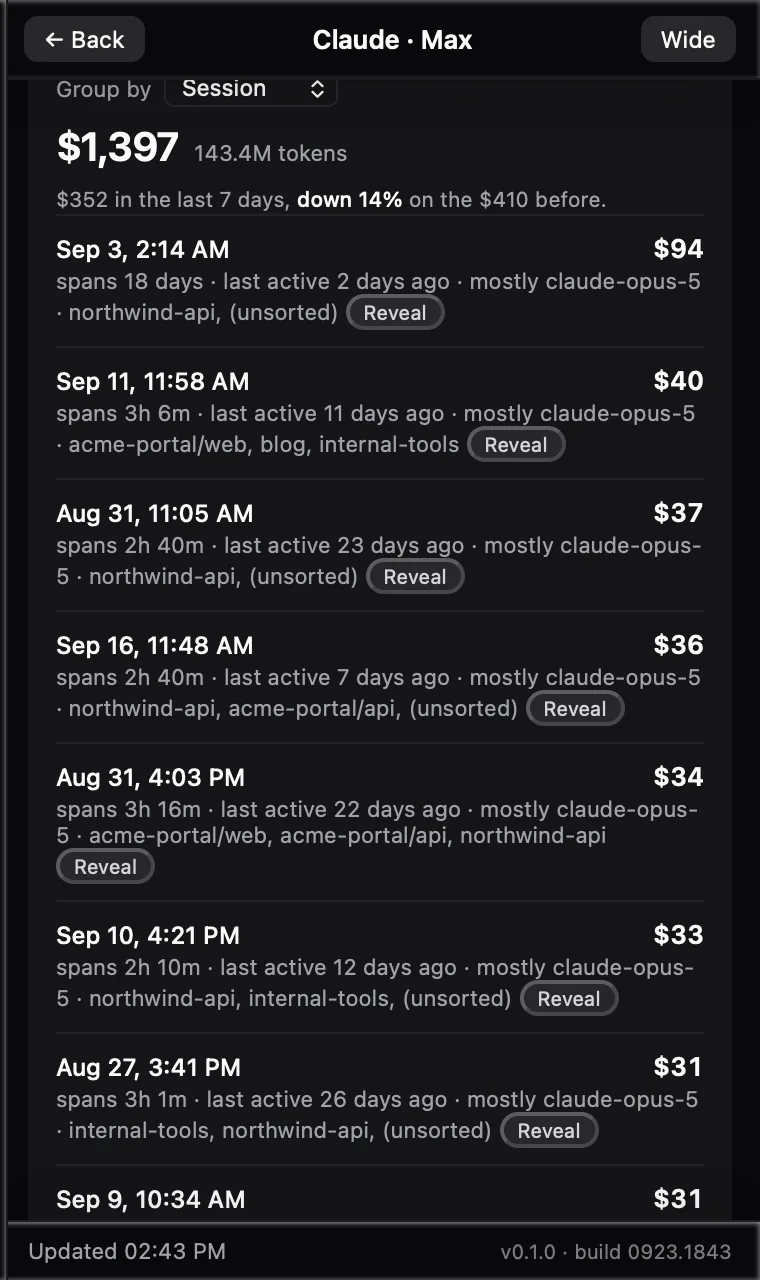
Every session of the monthHeaviest first, with when it last wrote a line. Reveal shows the log file; nothing here deletes, because those logs are also the spend data. 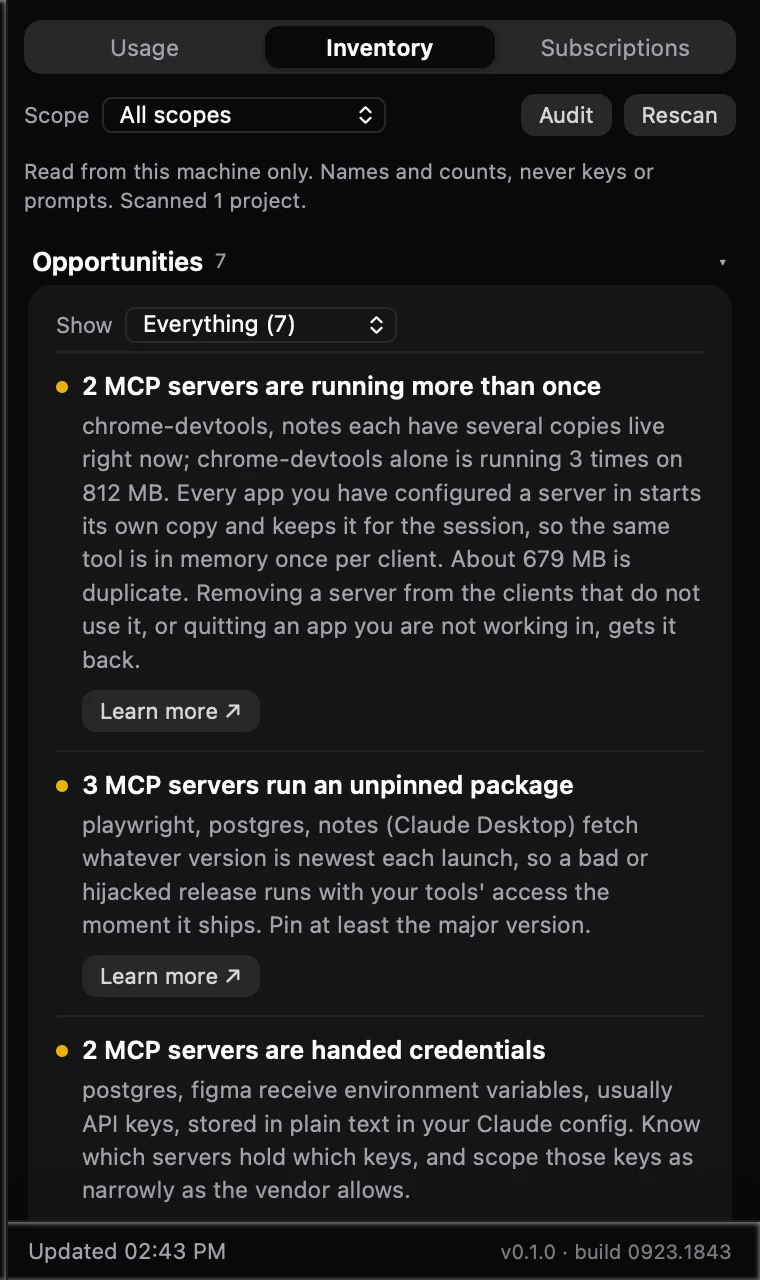
What is installed, and what to fixMCP servers, agents, skills and guardrails across seven apps. Opportunities are computed from your machine, never generic advice. 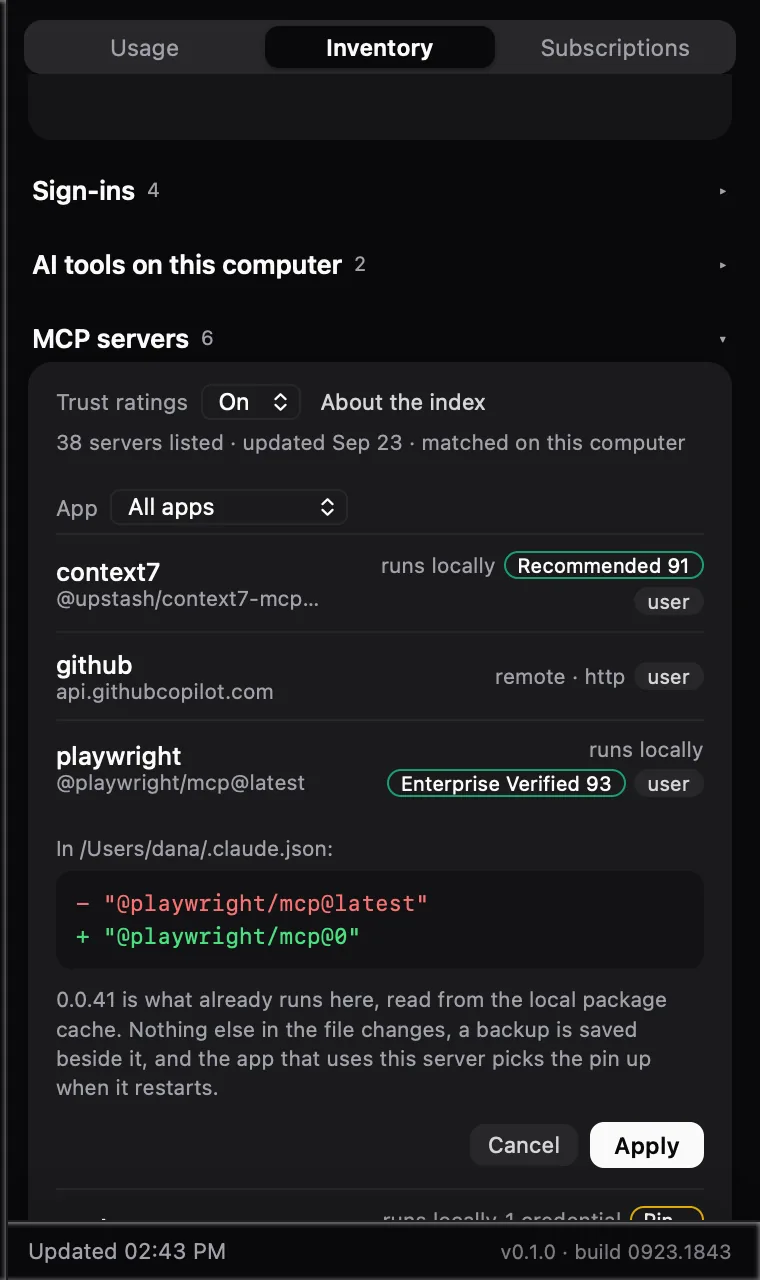
One-click pin, with a previewSee the exact line that changes before it does. One string is replaced, a backup is saved, nothing else moves. 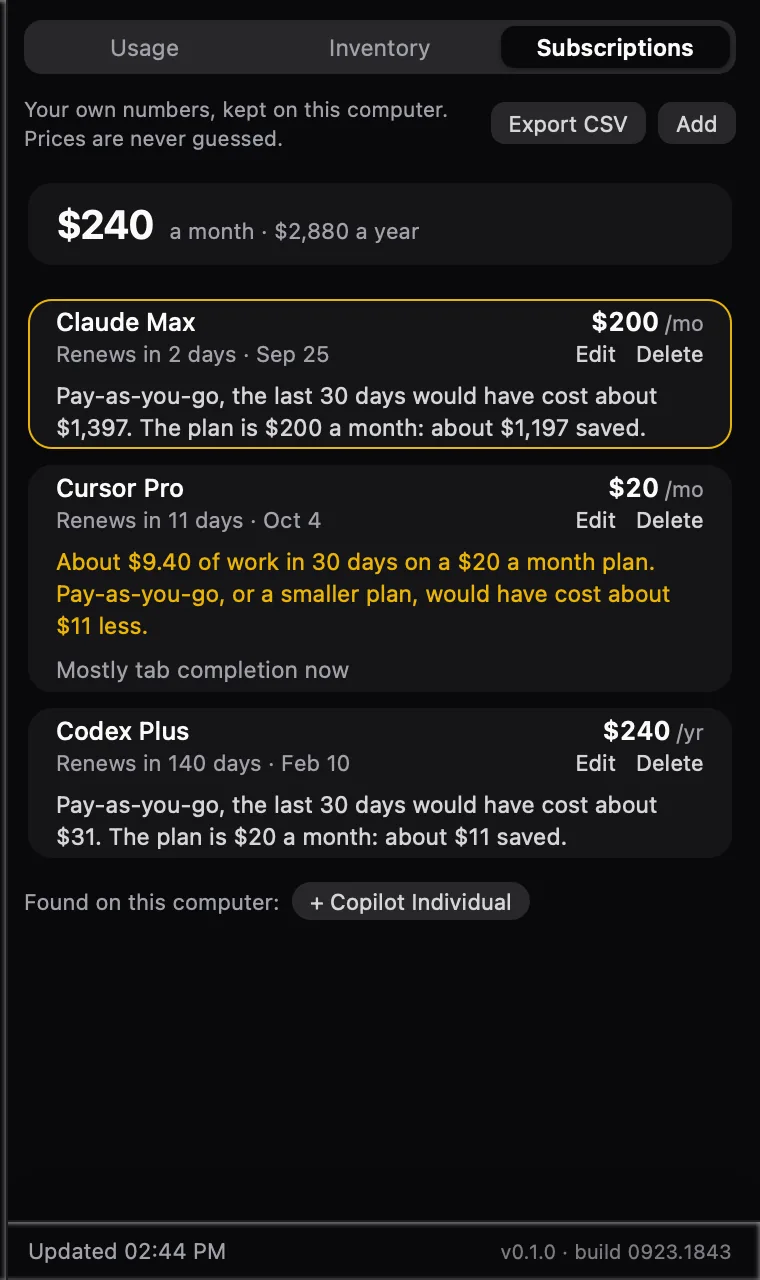
Is the plan worth it?Your own prices against what the same work would cost pay-as-you-go. It never guesses what you pay. 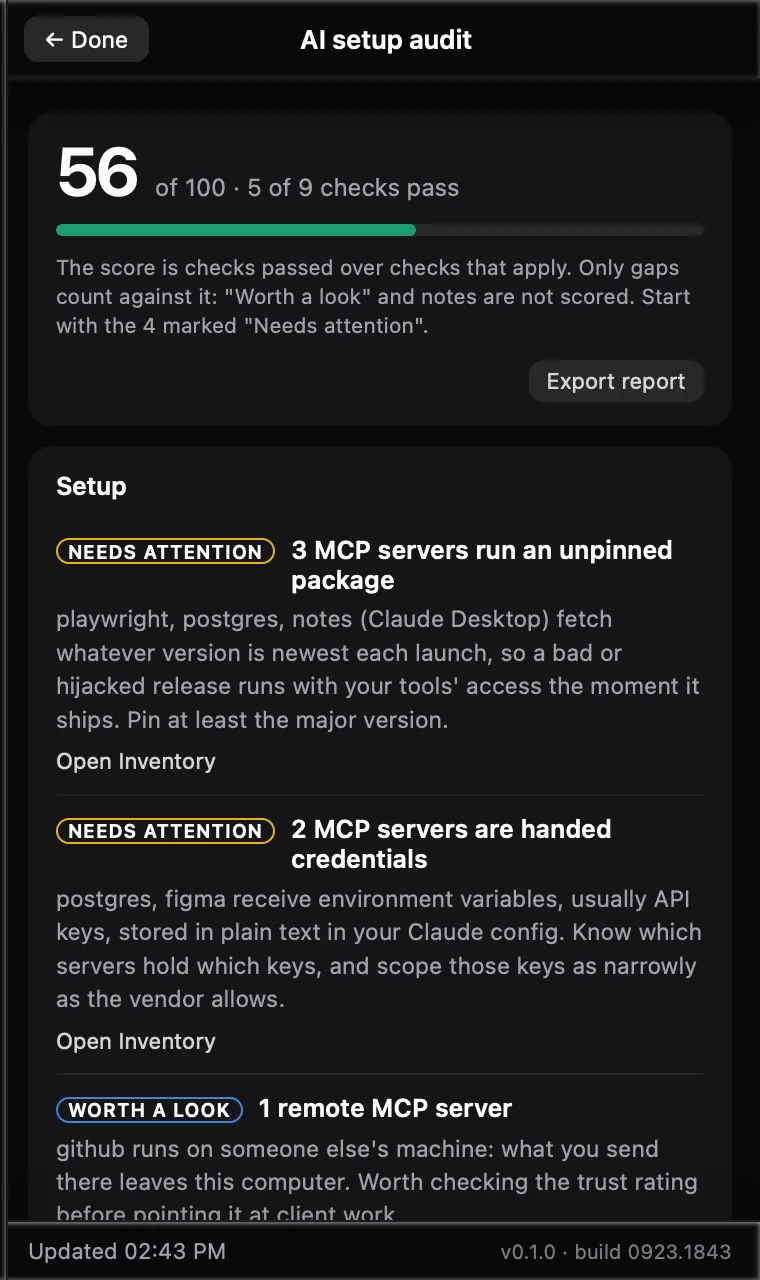
A scored audit of your setupChecks passed over checks that apply. Only real gaps cost points, and it exports as Markdown. 
Somebody lives in AboutPoke him. Then poke him nine more times.
Every screenshot is the real app showing a fictional machine. Acme Co and Northwind are not clients of anyone.
Don’t take the screenshots’ word for it. Use it.
This is the actual interface, compiled for the browser, running on numbers the real engine produced from a made-up computer. Nothing you click here goes anywhere.
- Click Claude’s name to open its detail page: the chart, the forecast, your week.
- In Spend, change Group by to Client, then click a bar to see the sessions behind it. Or to Session for every session of the month, each with a Reveal button.
- Hit Wide in the top corner. Same window, twice the room, no pop-out.
- Open Inventory and press Pin… on a server to preview the change.
- Open Subscriptions and find the plan that is not earning its keep.
- Run the Audit from Inventory. Then find the robot.
Why I built this.
I run a lot of AI at once: several subscriptions, a pile of MCP servers, agents working across client folders. No single place could tell me what all of it was doing, what it cost, or who it was for.
The old answer to “what is this computer doing?” was Ctrl+Shift+Esc. There was no equivalent for AI tools, so this is it. It reads what is already on your machine, the logs and config files your tools leave behind, and turns it into answers: what is running, what it costs, who it was for, and what is worth tightening.
It also teaches as it goes. Every finding says why it matters and links to the explainer, because the fastest way to learn how this stuff works is to see it on your own setup.

Everything it’s running.
The full feature list, laid out the way it should be. Watch the last column.
| Name | What it does | Network |
|---|---|---|
| See (9) | ||
| Running now | Every MCP server live on the machine, heaviest first, with how many copies each client app has started. Reads the process table; command lines never reach the screen. | 0 B |
| Agents running now | Every AI agent process on the machine: which tool, for how long, which folder and client, and its token pace from the newest session it is writing. The folder comes from lsof on macOS and from the process's own memory on Windows; command lines never reach the screen. | 0 B |
| Live limits | Session, weekly and model limits for each tool, with time to reset and pace. | vendor API only |
| Menu bar number | The limit closest to the wall, as plain text next to the icon. | 0 B |
| Spend | Today, yesterday and 30 days, priced from your local logs by model. | 0 B |
| Sessions | Every Claude Code session of the last 30 days by cost, with its age and the size of its log, and a Reveal button that shows the file. It never deletes one: those logs are also the spend data. | 0 B |
| Inventory | MCP servers, agents, skills and guardrails across Claude Code, Claude Desktop, VS Code, Cursor, Windsurf, Gemini CLI and Codex. Names and counts only, never a key. An MCP manager, in other words: pin, see what is live, end a copy. | 0 B |
| Sign-ins | Where the app looks for each tool's credentials and whether they are there, so "not signed in" and "looking in the wrong place" stop looking the same. A keychain entry is named, never opened. | 0 B |
| Subscriptions | A ledger of what you pay, when it renews and a reminder before it does. | 0 B |
| Understand (10) | ||
| Forecast | When a limit runs out at your recent pace, and only when that comes before the reset. | 0 B |
| Your week | A 7 × 24 heatmap of when a limit really gets used. | 0 B |
| Clients & work areas | Spend by folder, rolled up to the client it was for, with budgets and CSV export. | 0 B |
| Session drill-down | The sessions behind any bar: times, totals and models. Never a prompt or a title. | 0 B |
| Plan vs pay-as-you-go | Whether each subscription beats what the same work would cost at API rates. | 0 B |
| Week over week | The last 7 days against the 7 before, on every total. Silent until a fortnight of readings exists. | 0 B |
| Cost per commit | A work area's 30-day spend against the commits in that folder. A ratio, not a score: git is read, never written. | 0 B |
| Cost per agent | Thirty days of subagent runs by agent name: runs, cost and last use, for your own agents and the built-in ones. A subagent's spend counts toward the session that spawned it, never as a session of its own. | 0 B |
| Pricing check | Claude Code records what it was charged. The app compares that with its own rate card on the same tokens and tells you when they disagree, so the dollar figures are never quietly wrong. | 0 B |
| Usage coaching | Top-heavy model mix, sessions left open for weeks, spend nobody sorted. | 0 B |
| Act (10) | ||
| Setup audit | A scored read of the whole setup, exportable as Markdown. | 0 B |
| Agent guardrails | Three audit checks: an agent that may use every tool, a deny list that never names the shell, an agent with no pinned model. Ending an agent is deliberately not a button. | 0 B |
| One-click pin | Pins an unpinned MCP package to the version already in your local cache, after a preview. | 0 B |
| End task | Stop a server that is running away, from the list. Names a server, never a process id; asks rather than forces, and your client starts a fresh copy when it next needs one. | 0 B |
| Budget guard | Alerts for a limit burning fast, a daily spend mark and a client going over budget. | 0 B |
| Weekly digest | One notification a week with what was spent and what renews next. | 0 B |
| Trust ratings | Matches your MCP servers against the MCP Trust Index. Off until you turn it on. | opt-in · 1 GET a day |
| Update check | Asks this project’s own release feed on GitHub whether a newer version exists, and installs one only from the footer button you click. Off until you turn it on. | opt-in · GitHub only |
| Agents feed | A read-only /v1/agents for your own scripts: each agent's 30-day runs and cost with the client it was mostly for, and what is running right now. The working folder, the process id and the session id never leave the machine, even on this computer. | opt-in · loopback only |
| Team mode | A headless agent and a self-hosted collector for a team view with policy checks. Reports carry counts and package names, never paths, prompts or clients. | your server only |
Yours alone, or your whole team’s.
One codebase, two ways to run it, both free and MIT licensed.
On your own machine
The menu bar app is the whole product.
Limits and spend for every tool you pay for, the subscriptions behind them, every MCP server running right now, the agents, skills and guardrails your tools have installed, and a scored audit of the lot. Nothing is held back for a paid tier, because there is no paid tier: use it as it is, or fork it and change what you like.
- MCP servers are read across Claude Code, Claude Desktop, VS Code, Cursor, Windsurf, Gemini CLI and Codex; agents, skills, hooks and permission rules from the config Claude Code already keeps, user-level and per project.
- Every session of the last 30 days by cost, every dollar landed on the client it was for, and a forecast of when a limit runs out.
- A read-only local API for your own scripts, on this computer only.
Across a team
The same engine, headless.
A one-command agent builds a seat report from the same code the app runs and pushes it to a collector you host: one process, one folder of JSON files, a token on every request, on your network only. There is no daemon; IT runs it from cron, launchd or Task Scheduler and decides when a seat reports.
- A policy file beside the collector turns its dashboard into a conformance view: allowed and blocked MCP packages, pinned versions required, remote servers refused, a minimum number of deny rules, which AI tools may be present, agents must list their tools, the shell must be denied, and named hooks must exist.
- The verdict is computed on the collector from what each seat reported. A seat cannot claim to conform.
- The dashboard also totals agent spend across every seat: built-in agent names only, with anything you wrote yourself summed into one row called custom, so a name never leaves a seat.
- The report has no field that could hold a prompt, a path, a folder or client name, a session id or a credential, and a test plants each of those to prove it.
- Both halves are crates in the same repository, built with cargo, under the same license.
App privacy.
The label an app store would make us fill in, answered properly.
Data collected
None. There is no server to send it to.
No analytics, no crash reporting, no account, and no update pings unless you switch update checks on. The tracking module that came with the upstream project was removed, not switched off.
- Reads credentials your tools already stored, only to ask each vendor for your own limits. It never writes to the Keychain or Credential Manager.
- Reads metadata from local logs: models, token counts, folders, times. Never prompts, replies or conversation titles.
- Writes to another tool’s file in exactly one place: the pin you clicked Apply on.
The two exceptions
Trust ratings and update checks, if you switch them on.
Once a day the app downloads the public Trust Index list from staas.fund and matches it on your computer; the request has no parameters, so it says nothing about which servers you run. Update checks ask the GitHub release feed for the latest version number on launch, when you open the app and every four hours; that request carries nothing about you or the machine. Both are off by default.
- Everything else on the network is a tool’s own vendor API, the same calls the tool itself makes.
- The local API for your own scripts listens on this computer only, and the feeds with folder or client names stay off until you enable them.
- It is MIT licensed and the whole thing is on GitHub, so none of this is a promise you have to take on trust. The privacy page lists every network call and the commands that prove it.
Information.
- Made by
- Peter Saddington, StaaS Fund
- Version
- 0.1.2September 2026. Installers unsigned. See what changed
- Category
- Developer tools
- Compatibility
- macOS and Windows 10 / 11Built with Tauri: a Rust core and the system webview
- Size
- 26 MB installed19 MB download on macOS, 6 MB on Windows
- Languages
- English, 中文, Русский, Español, Français, Deutsch, 日本語, Português (Brasil), 한국어
- Works with
- Claude, Codex, GitHub Copilot, Cursor, OpenRouter, ElevenLabs, Grok, DeepSeek, Kimi, Qwen, Z.ai, Ollama and moreChecked end to end on macOS so far: Claude and Copilot. The rest came across from Windows and are being verified.
- Price
- FreeNo in-app purchases. No upsell. MIT license.
- Standing on
- Pane by Jazii, the Windows tray app this grew from, and OpenUsage by Robin Ebers, the macOS original.Both MIT. Their provider research made this possible.
- Learn more
- The Library · MCP Trust Index · The Open Classroom
Questions, answered.
The ones people ask before they install it, and the two that came up the first week it ran on my own machine.
Is it free?
Yes. It is MIT licensed and the whole source is on GitHub, the team half included. There is no account, no upsell and no paid tier. Use it as it is, or fork it and change whatever you like.
How do I install it?
Download the installer for your platform from the GitHub release: a universal .dmg for macOS, Intel and Apple Silicon alike, or a setup .exe for Windows 10 and 11. Neither is code-signed yet. On macOS, open the app once and let macOS block it, then open System Settings, choose Privacy & Security, scroll to Security and click Open Anyway; after that it opens normally. On macOS 14 or earlier, right-click the app and choose Open instead. On Windows, SmartScreen will warn: choose More info, then Run anyway. Prefer to read what you run? Clone the repository and build it in about ten minutes; the README has the steps for both platforms.
Does anything leave my computer?
No. Your limits, spend, folder names and client names stay on the machine. Each tool's token goes to that tool's own vendor API and nowhere else. There are two exceptions, both off by default: the MCP Trust Index lookup fetches a public list once a day, and update checks ask GitHub for the latest version number. Neither sends anything about you. The privacy page lists every network call and the commands that prove it.
It says I am at 100% but my week just reset. Is it stuck?
Almost certainly you are looking at the Extra usage row, which is Anthropic's monthly pay-as-you-go cap, not the weekly limit. It does not move with the week; it moves with the billing cycle. The row says “monthly cap” and the real percentage for exactly this reason. If a refresh you asked for could not reach a provider, the footer says so and names the time the shown numbers are from. And the app never asks a vendor twice inside a minute, so clicking Refresh right after its own poll no longer trips a rate limit and freezes the card.
Why do the spend figures not match my bill?
They are a floor, not an invoice. Spend is priced from your tools' local logs at API rates, and on Claude that reads about 23% low because 1-hour cache writes are billed at twice the rate the catalogue assumes. The app checks its own catalogue against the vendor's recorded cost and says when it is off, rather than quietly reporting a number it cannot stand behind.
Is this an MCP manager?
Yes, that is the Inventory tab: every MCP server across Claude Code, Claude Desktop, VS Code, Cursor, Windsurf, Gemini CLI and Codex, pinned or not, which copies are live right now and how much memory they hold, and a way to end one. Names and counts only, never a key.
Does it manage agents too?
Yes. Running now lists every agent process with its folder, client and token pace; Inventory shows each agent definition with its runs and cost over 30 days; the audit checks agent guardrails; and a team policy can require them. That folder now resolves on Windows as well as macOS. Ending an agent is deliberately not a button, because killing one mid-task destroys work.
Can it delete my old Claude Code sessions?
No, and it will not. Group Spend by Session and every session of the last 30 days is listed by cost with its age and the size of its log; Reveal shows you the file so you can archive it yourself. The app never deletes a session, because those logs are also where its spend figures come from. It changes your machine in exactly two places, both behind a confirmed click: ending a running server, and pinning a package version.
Which tools does it support?
23 providers, including Claude, Codex, GitHub Copilot, Cursor, OpenRouter, Grok, DeepSeek, Kimi, Qwen, Z.ai and Ollama. Honestly: only Claude and Copilot are verified end to end on macOS so far; the rest came across from the Windows original and are being checked. Inventory › Sign-ins shows exactly where each one looked on your machine.
Mac and Windows? Intel and Apple Silicon?
macOS and Windows 10 and 11, from one codebase. It builds on either kind of Mac; the machine I test on is an Intel Mac, so that is the one with the most hours on it.
What languages does it speak?
English, 中文, Русский, Español, Français, Deutsch, 日本語, Português (Brasil) and 한국어: nine in all. It follows the system language by default, and can be set explicitly in Settings. Every view translates, findings, audit checks and notifications included.
How do I update it?
Switch on Check for updates under Settings, Network; it is off by default. Turned on, the app asks the GitHub release feed for the latest version when it launches, when you open it and every four hours, sending nothing about you, and a button in the footer installs a new one only when you click it. Or download the next release yourself, or pull and rebuild.
Can my team use it?
Yes, and that half is free too. A headless agent reports each seat's inventory to a collector you host yourself: one process, one folder of JSON files, a token on every request. A policy file on the collector turns its dashboard into a conformance view: allowed and blocked MCP packages, pinned versions required, remote servers refused, a minimum number of deny rules, which AI tools may be present, agents must list their tools, the shell must be denied, and named hooks must exist. The verdict is computed from what the seat reported, never claimed by the seat. The report carries counts and package names, never paths, prompts, clients or credentials, and a test plants each of those to prove they cannot appear.
Is the demo real?
The interface is the real one, compiled for the browser. The numbers come from the real engine run against a made-up computer: an invented freelancer, invented clients. Nothing you click in it goes anywhere.

Download it, or make it yours.
Version 0.1.2 is on GitHub Releases for macOS and Windows: free, MIT licensed, built from the tagged source by the repository’s own workflow. Neither installer is code-signed yet, so expect to allow the app once under Privacy & Security on macOS and a SmartScreen warning on Windows; the README walks through both. Prefer to read what you run, or want it to do something else? Clone it, build it yourself in about ten minutes, and change whatever you like. The team half ships under the same license.